
Included with the AI Tool Bundle
Instant Roofer MCP Server: Connect Roof Measurements to Your CRM
Connect Instant Roofer to compatible AI assistants and put instant roof measurements to work in your CRM, mailing lists and other workflows.
- Use AI Instant Measure Reports from inside your AI assistant
- You choose what each assistant is allowed to do
- Included with an active AI Tool Bundle subscription
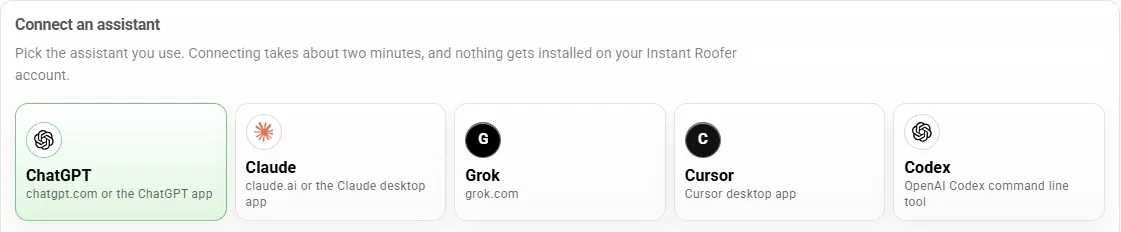
Connect an assistant
Pick the assistant you use. Connecting takes about two minutes, and nothing gets installed on your Instant Roofer account.
-
 ChatGPT chatgpt.com or the ChatGPT app
-
 Claude claude.ai or the Claude desktop app
- G Grok grok.com
- C Cursor Cursor desktop app
- Codex OpenAI Codex command line tool
Instant Roofer
Roof measurements
AI Assistant
With your permission
Your CRM
Leads and workflows
The Roofing MCP Server, Explained
What Is the Instant Roofer MCP Server?
It lets the AI assistant you already use work with your Instant Roofer account. Ask it to measure a roof, find a report or look up a lead, then bring those roof measurements into your CRM or another connected workflow without retyping them.
Nothing happens without your say. The assistant can only use the Instant Roofer tools you approve when you connect it, and you can review or disconnect it later.
In plain English
MCP = Model Context Protocol
A connection standard that lets compatible AI assistants use authorized tools and data from another service. Think of it as a plug that fits many assistants, so Instant Roofer does not need a custom build for each one.
Inside the Dashboard
Connect Your AI Assistant
- 1 Choose your assistant.
- 2 Connect your Instant Roofer account.
- 3 Approve what it can do.
Swipe to see all five assistants
When you connect an assistant, you choose which permissions it gets, such as viewing reports, running new measurements or working on quotes. You can review your connected assistants on the same screen and disconnect them at any time. Admins can also switch AI assistants off for any team member.
Your Instant Roofer MCP server address
https://mcp.instantroofer.com/mcp Step-by-step instructions for each assistant are in your dashboard under Company Settings, AI Assistants, since assistant menus change over time.
How It Works
From Address to CRM in Four Steps
- 1
Connect Instant Roofer to a compatible AI assistant
Authorize the assistant to use the Instant Roofer tools you allow.
- 2
Connect the other tools in your workflow
Your CRM or other destination must support the relevant connection or integration.
- 3
Use roof data in your workflow
For example, ask the assistant to look up an address, run or pull up an AI Instant Measure Report, and use the numbers in a connected workflow.
- 4
Review and act
Use the information to support follow-up, estimating and quoting, with your approval where it is required.
Setup, available actions and how much is automated depend on your assistant, your CRM, the permissions you approve and how everything is configured. Instant Roofer does not have a native integration with every CRM, and connecting your other systems is a separate step.
CRM Lead Enrichment for Roofers
Enrich Leads With Roof Data
When roof measurements are already on the lead, your sales team has more property context before they call the homeowner. AI roof measurements come back in 15 seconds, so the numbers can be ready while the lead is still fresh.
- Reduce repetitive roof lookups and data entry
- Give salespeople useful property information earlier
- Support more informed conversations, estimates and quotes
- Bring roof data into compatible CRMs, mailing lists and other software
Example roof details for a lead
- Roof area
- Pitch
- Facets
- Perimeter
- Estimated squares
Available fields depend on the report and on what your destination can receive. Measurements describe the roof; they do not include homeowner contact details.
What an Assistant Can Do
Roof Measurement MCP Tools, With You in Control
Each action is a permission you can allow or leave off when you connect an assistant.
Measure a Roof by Address
Run an AI Instant Measure Report for an address. Each run counts against your assistant measurement allowance.
Find Reports and Customers
Pull up past measurements and reports, or search existing customers and leads by name, address or phone so data lands on the right job.
Bring Data Into a CRM
Send measurement details into a compatible workflow you have set up, such as a CRM connected to the same assistant or a configured webhook.
Build and Update Quotes
Create or edit quotes from the data you have. Creating or editing a quote does not send anything to a customer.
Send an Approved Quote
An assistant can email a quote link to the customer only after you confirm the recipients in the conversation.
Order a Human Certified Report
When you need one, place an order that uses your available report credits or an authorized payment. These reports are not free or unlimited.
Automation and Webhooks
Send New Leads and Measurements Where You Need Them
Instant Roofer supports configurable webhooks for new leads and AI Instant Measure results. Once an admin sets one up, it can send that data to a compatible destination, such as a CRM that accepts incoming webhooks. Not every CRM supports this without setup, and some need a developer or an automation tool in between.
Included With the AI Tool Bundle
Instant Roofer MCP server access is included with an active AI Tool Bundle subscription.
The same bundle includes AI Instant Measure Reports, the mobile app, the CRM and website conversion tools, all for one flat price for continued access.
- AI Instant Measure Reports
- Mobile App
- CRM
- Quote Generation
- Website Calculator
- Website Contact Form
- Online Scheduler
- Orders Online
Need higher-volume automation? Explore the separately billed Measurement API.
You control access to your data. Connections require your permission, and you can review or disconnect connected services.
An assistant can never do more than the person who connected it. Read how assistant connections are handled in our privacy policy.
Frequently Asked Questions
Common questions about the Instant Roofer MCP server
What is the Instant Roofer MCP server?
What does MCP stand for?
How can I bring roof measurements into my CRM?
Does Instant Roofer connect to every CRM?
Which AI assistants can I use?
Is MCP access included with the AI Tool Bundle?
How many measurements can an AI assistant run?
Can I control which services access my data?
Do I need technical help?
Join 4,000+ Registered Contractors already using Instant Roofer
Put Your Roof Data to Work With MCP
Connect Instant Roofer to your AI tools and bring useful property data into your workflow.
A 7-day unlimited Premium trial, then one flat price for continued access · No credit card required