
Instant Roofer API Documentation
AI Instant Measure Reports API (June 2026)
By default, AI Measure v2 includes facets, classification, LiDAR fields, a map outline image, and AI confidence when available.
Instant Roofer AI can make mistakes (e.g., sparse LiDAR, heavy tree cover, complex multi-structures). Please review the confidence score of each measurement.
Send latitude/longitude to the v2 route with your API key. If resultOptions is omitted, mapWithOutlineFromImageModel, facetMeta, and facetPoints default to true.
cURL (EXAMPLE)
curl -X POST https://v5.instantroofer.com/v2 \
-H "Authorization: Bearer YOUR_API_KEY" \
-H "Content-Type: application/json" \
-d '{
"latitude": 32.865378,
"longitude": -111.677416
}'
Example Response
v2 groups measurement data by purpose and includes the AI confidence display when the model returns a score.
JSON
{
"version": "v2",
"measurements": {
"sqft": { "aerial": 3215, "measured": 3483, "suggested": 4006 },
"squares": 40.1,
"pitch": "5/12",
"complexity": 3,
"perimeter": 262,
"facets": 6,
"stories": 2,
"confidence": {
"score": 0.36,
"display": {
"value": "High"
}
}
},
"imagery": {
"mapWithOutline": "base64 encoded image"
},
"lidar": {
"facets": { "predicted_count": 6 },
"roofPointsFacetedXYZK": []
}
}
Note: measurements.stories is a beta response field and is actively improving. Treat it as an estimate and review it before using it for project decisions. lidar.roofPointsFacetedXYZK is shown as an empty array for brevity; default responses include an array of faceted LiDAR points when available.
Response Field Reference
The v2 response groups related data so each part of the payload has a clear purpose.
measurements
- sqft.aerial — building footprint in square feet before pitch is applied.
- sqft.measured — building footprint in square feet after applying the standard pitch calculation derived from the predominant roof pitch.
- sqft.suggested — recommended square footage of material needed to replace the roof.
- squares — the same recommended material amount as sqft.suggested, converted into roofing squares.
- pitch — the roof rise over run, returned as the predominant pitch. Predominant pitch is the most common pitch across all detected roof facets.
- complexity — roof complexity class: 0 = Low, 1 = Moderate, 2 = High, 3 = Extreme. Complexity is primarily determined by hips and expected waste.
- perimeter — outside linear feet of the building footprint or roof footprint.
- facets — count of roof facets determined by the system.
- stories — beta estimate of story count based on extracting roof height from the ground.
- confidence.score — model confidence score for the measurement prediction.
- confidence.display.value — customer-facing confidence label. The numeric score is automatically translated into Low, Medium, or High.
- Coordinates — Confirms the latitude and longitude received for the measurement record.
buildingPredictions
- complexityClass — predicted roof complexity class using the same 0 to 3 scale as measurements.complexity.
- complexityProb — probability score for the predicted complexity class.
- complexityWaste — estimated waste percentage associated with the predicted roof complexity.
- townhomeProb — probability that the detected building is a townhome.
- commercialProb — probability that the detected building is commercial.
- isTownhome — boolean townhome prediction derived from townhomeProb.
- isCommercial — boolean commercial prediction derived from commercialProb.
- If isTownhome and isCommercial are both false, the building is predicted to be single family.
imagery
- mapWithOutline is a static Google image with a regularized polygon around the specific building measured. It confirms the identified building visually, but it is not an indicator of measurement accuracy.
lidar
- facets.predicted_count — predicted count of detected roof facets.
- roofPointsFacetedXYZK — detailed faceted LiDAR points when available. These points contain the underlying facet size and pitch detail used by the system.
AI Confidence
Instant Roofer uses many sources of information to determine roof size. The returned image with outline is a visual reference only and should not be treated as the sole indicator of measurement quality. AI confidence is the stronger indicator of how confident Instant Roofer is in the measurement result.
Confidence Buckets
- Low (< 0.24): lower confidence in the measurement result. Review the report carefully before using it for bids or material orders.
- Medium (0.24 – 0.34): moderate confidence in the measurement result. Review is still recommended, especially for complex or partially obstructed roofs.
- High (>= 0.35): stronger confidence in the measurement result. Review is still recommended for critical project decisions.
Possible Error Responses
- 400 — Invalid or missing coordinates
- 401 — Missing/expired/invalid API key
- 402 — Human Certified Report usage limit reached
- 403 — v2 is not enabled for this API key, or Human Certified Reports are not enabled for this API key
- 404 — Roof not found. Please make sure your latitude/longitude is in the center of a building.
- 409 — Duplicate Human Certified Report request for the same coordinates within the duplicate window
- 422 — Roof too large or irregular
- 429 — Rate limit exceeded
- 500 — Internal measurement error
- 502 — Upstream forwarding error
- 504 — Upstream timeout
Human Certified Report Ordering API (June 2026)
Human Certified Reports can be requested from the v2 endpoint with reportType: "human". They use the Human Certified Report workflow instead of the AI Measure v2 response payload.
cURL (Human Certified Report with optional job context)
Required fields are latitude, longitude, and reportType: "human". contractorName, customerName, and originalAddress are optional.
curl -X POST https://v5.instantroofer.com/v2 \
-H "Authorization: Bearer YOUR_API_KEY" \
-H "Content-Type: application/json" \
-d '{
"latitude": 32.865378,
"longitude": -111.677416,
"reportType": "human",
// Optional job context:
"contractorName": "ABC Roofing",
"customerName": "Jane Smith",
"originalAddress": "123 Main St, Casa Grande, AZ 85122"
}
Human Certified Report Optional Fields
Human Certified Report requests may include additional job context. These fields are optional, but recommended when available because they appear in our team drawing queue and help the drawing team identify the correct order.
contractorName — optional contractor or company name for the job, up to 255 characters
customerName — optional homeowner/customer name, up to 255 characters
originalAddress — optional source property address entered by the customer, up to 1000 characters
These fields are only used for Human Certified Report workflow context. Latitude and longitude remain required and are still the source of truth for where the report is drawn.
Human Certified Report Accepted Response
{
"ok": true,
"code": "HUMAN_QUEUED",
"message": "Human report request accepted.",
"requestId": "generated-request-id",
"humanReportId": "generated-human-report-id",
"companyId": "your-api-key-id",
"companyName": "Your Company",
"coords": {
"latitude": 32.865378,
"longitude": -111.677416
},
"contractorName": "ABC Roofing",
"customerName": "Jane Smith",
"originalAddress": "123 Main St, Casa Grande, AZ 85122"
}
Webhooks for Human Certified Measure Report Completions & Rejections (June 2026)
Human Certified Report webhooks notify your system when report files are ready, or when a Human Certified Report fails. Webhooks are configured per API key and per report format: CSV, PDF, HTML, and XML.
MINIMUM REQUIRED PAYLOAD FIELDS SHOULD BE:
requestID - dynamic - order.request_id
url - dynamic - report.url
status - dynamic - order.status_code
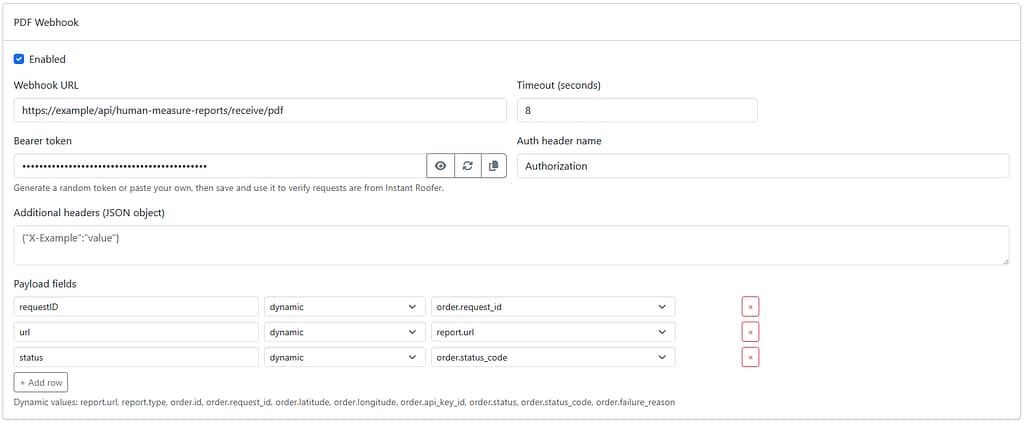
Only enabled webhook types with a URL are sent. A completed report can trigger more than one webhook if multiple report formats are enabled.
You can setup your webhooks in your customer dashboard. You can also email support for us to add them.
When Webhooks Are Sent
When a Human Certified Report completes, Instant Roofer sends one webhook for each enabled report format that has a generated file URL.
When a Human Certified Report fails, Instant Roofer sends enabled report-format webhooks with the failure status and no report URL. Supported report formats are csv, pdf, html, and xml.
Delivery Request
Instant Roofer sends a JSON POST request to the configured webhook URL. The request uses Content-Type: application/json.
Authentication Headers
You can configure a bearer token for each report type.
The default auth header name is Authorization.
If the token does not start with Bearer , Instant Roofer automatically prefixes it.
You can also configure extra static headers as JSON.
Timeout
The default webhook request timeout is 8 seconds. Admins can configure a timeout from 1 to 60 seconds per report type.
Payload Fields
Payloads are configurable. Admins choose the outgoing JSON keys and map each key to either a static value or one of the dynamic values below.
Dynamic Values
- order.id - Human Certified Report order ID.
- order.request_id - API request ID returned when the report was queued.
- order.api_key_id - API key ID associated with the request.
- order.latitude - requested latitude.
- order.longitude - requested longitude.
- order.contractor_name - optional contractor/company name submitted with the request.
- order.customer_name - optional homeowner/customer name submitted with the request.
- order.original_address - optional source property address submitted with the request.
- order.status - current Human Certified Report status, such as completed or failed.
- order.status_code - final status code for the report workflow.
- order.failure_reason - failure reason when the report fails.
- report.type - report format for this webhook: csv, pdf, html, or xml.
- report.url - generated report file URL when available.
Example Payload
The example below assumes you configure the event as a static value and map the remaining fields from dynamic values.
{
"event": "human_report.completed",
"reportType": "pdf",
"reportUrl": "https://example.com/report.pdf",
"humanReportId": "generated-human-report-id",
"requestId": "generated-request-id",
"status": "completed",
"latitude": 32.865378,
"longitude": -111.677416,
"contractorName": "ABC Roofing",
"customerName": "Jane Smith",
"originalAddress": "123 Main St, Casa Grande, AZ 85122"
}
Example Failure Payload
Failed report webhooks can use the same configured payload shape, with failure-specific fields mapped from the order.
{
"event": "human_report.failed",
"reportType": "pdf",
"humanReportId": "generated-human-report-id",
"requestId": "generated-request-id",
"status": "failed",
"statusCode": 422,
"failureReason": "Human report failed"
}
Recommended Response
Return any 2xx status code after your system safely receives the webhook. Instant Roofer marks the delivery as sent when your endpoint returns 200 through 299.
{
"ok": true
}
Retries and Delivery Status
- sent - your endpoint returned a 2xx response.
- pending - delivery is waiting to be sent.
- sending - delivery is currently in progress.
- failed - delivery failed but is scheduled for retry.
- dead - delivery will not retry automatically.
Retryable Responses
Instant Roofer retries timeouts, network errors, and these status codes: 408, 429, 500, 502, 503, and 504.
Retry Schedule
Retries use this backoff schedule: 15 seconds, 60 seconds, 5 minutes, 30 minutes, and 2 hours. After the final retry is exhausted, the delivery is marked dead.
Non-Retryable Responses
400, 401, 403, and 404 are marked dead because they usually indicate a bad URL, rejected authentication, or an invalid request.
Best Practices
Store webhook payloads idempotently. A retry can deliver the same report event more than once.
- Respond quickly with a 2xx status, then process heavy work asynchronously.
- Use a bearer token or custom auth header to verify requests are from Instant Roofer.
- Log humanReportId, requestId, and reportType for support and reconciliation.
- Do not rely on the webhook alone for billing; Human Certified Reports are billed from Instant Roofer’s report workflow.